
What if the most dangerous part of a cyberattack isn’t the malicious code, but the specific way it makes you feel? You’ve likely sat through dozens of mandatory training sessions that tell you to look for typos or strange email addresses. It’s exhausting to keep up when 82% of successful data breaches still involve a human element. You’re tired of feeling like the weakest link in a system that’s supposed to protect you. We’re here to change that narrative by helping you master the signs of phishing through a lens of behavioral science and modern technology.
You probably recognize that familiar spike of anxiety when an “urgent” request hits your inbox; that’s exactly what attackers want. This guide empowers you to identify these emotional traps alongside technical red flags so you can act with confidence rather than fear. We’ll explore how to transform your daily digital routine into a series of simple, effective habits that strengthen your organization’s security culture from the inside out.
Key Takeaways
- Learn how phishing has evolved from basic scams into sophisticated, AI-driven attacks that mimic the people you trust most.
- Discover how to spot the technical signs of phishing by analyzing subtle digital breadcrumbs like typosquatted domains and hidden hyperlinks.
- Understand the psychological triggers, such as manufactured urgency and authority bias, that attackers use to bypass your natural skepticism.
- Master the “Pause and Reflect” habit to verify suspicious requests through independent channels before you click or share sensitive data.
- Shift from simple compliance to a resilient security culture by using frequent, human-centric micro-learning to manage modern risk.
What is Phishing in 2026? Beyond the Basic Email Scam
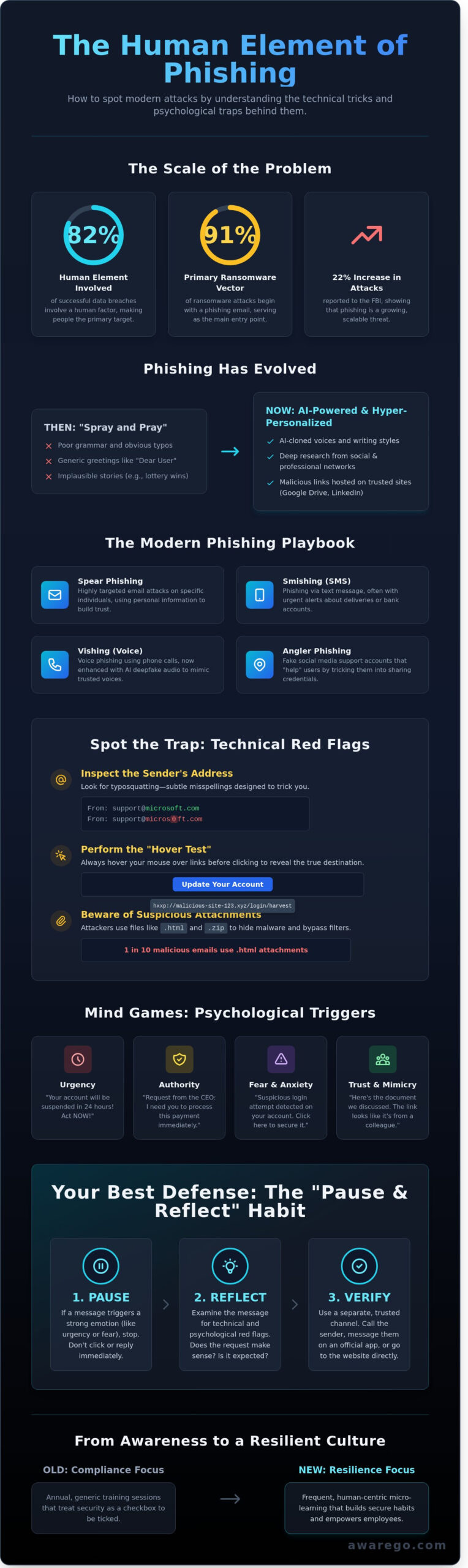
Phishing isn’t just a nuisance; it’s a sophisticated psychological operation. At its core, What is Phishing? is a social engineering attack that manipulates individuals into divulging sensitive information or granting access to secure systems. By 2026, the game has changed entirely. We’ve moved far beyond the era of poorly spelled emails from distant royalty. Today, attackers use hyper-personalized AI clones to craft messages that look, sound, and feel exactly like your colleagues. In 2024, the FBI’s Internet Crime Complaint Center recorded a 22% increase in reported phishing incidents, and that number continues to climb as automation makes these attacks easier to scale.
This evolution makes identifying the signs of phishing more challenging than ever before. Phishing remains the primary entry point for 91% of successful ransomware attacks and data breaches according to recent security benchmarks. While “spray and pray” tactics still exist, the real danger lies in spear phishing attacks that target specific individuals and whaling. These targeted strikes focus on specific individuals or high-level executives. Attackers spend weeks researching their targets on professional networks to ensure their bait is irresistible. They don’t just want a password; they want the keys to your entire infrastructure.
The goal is no longer just a quick theft. It’s about long-term access. Once an attacker is inside, they can move laterally through your network for months without being detected. This makes your team’s ability to spot the subtle signs of phishing the most critical part of your security culture. You aren’t just protecting a mailbox. You’re protecting your entire organizational resilience and the trust of your clients. Empowering your team with confidence is the only way to stay ahead of these shifting tactics.
The Different Faces of Phishing Today
Email phishing remains the dominant medium for corporate attacks, but your mobile phone is the new frontline. Smishing (SMS phishing) and vishing (voice phishing) have surged, with deepfake audio technology allowing attackers to mimic a manager’s voice in seconds. Angler phishing is also on the rise. In this scenario, attackers create fake customer service accounts on social media. They wait for your employees to post a complaint or a question, then swoop in with a “helpful” link that steals their credentials. These tactics bypass traditional office boundaries and catch people when their guard is down.
Why Traditional Filters Aren’t Enough
We’re currently in an arms race between secure email gateways and generative AI. Technical filters often struggle to keep up because attackers now use legitimate platforms. By hosting malicious payloads on Google Drive, LinkedIn, or Dropbox, hackers bypass the blocks that usually catch suspicious URLs. A 2024 report from Verizon found that 68% of breaches still involve the human element despite millions spent on software. This is why Human Risk Management (HRM) is so vital. Your people are the final layer of defense. When technology fails, their habits and confidence are what keep your data safe. Building a strong security culture means turning every employee into a proactive sensor for threats, ensuring that security is a shared responsibility rather than a technical hurdle.
The Technical Signs of Phishing: Examining the Digital Breadcrumbs
You don’t need to be a forensic expert to spot a digital trap. You just need to know where the breadcrumbs lead. Attackers often rely on speed and psychological pressure, hoping you’ll miss the small technical flaws in their delivery. Recognizing these signs of phishing is the first step toward building a resilient security culture within your organization. It’s about shifting from passive receiving to active observation.
Technical red flags are often hidden in plain sight. Here is what you should look for when an email feels slightly “off”:
- The Sender’s Address: Look for typosquatting. This involves subtle changes that mimic legitimate brands. An attacker might use “micros0ft.com” instead of “microsoft.com” or “amozon.co” instead of “amazon.com”. These variations are designed to bypass a quick glance.
- The Hover Test: This is your most effective manual tool. Before clicking any link, hover your mouse over it. Your browser or email client will display the actual destination URL in the bottom corner of the window. If the link says “Update Your Account” but the hover text points to a string of random numbers or an unfamiliar domain, stop immediately.
- Suspicious Attachments: Treat .zip, .html, and .pdf files with extreme caution. In 2023, data showed that 1 in 10 malicious emails used .html attachments to facilitate credential harvesting. These files can host local phishing pages that bypass traditional cloud filters; they’re essentially a fake login page sitting right on your computer.
- Branding Inconsistencies: Professional organizations are protective of their brand. Look for mismatched logos, blurry icons, or fonts that don’t quite match the company’s usual style. An outdated copyright footer from 2021 in a 2024 email is a clear sign that something is wrong.
- Generic Greetings: While some sophisticated spear-phishing uses your name, many campaigns still use “Dear Customer” or “Valued Member.” Legitimate services you have an account with will almost always use your specific name. Using a generic greeting is a massive red flag indicating a bulk attack.
Learning to recognize and avoid phishing scams involves more than just a quick look at the body text. It requires a habit of digital skepticism. When your team develops these habits, they become a human firewall that software alone cannot replicate.
Deconstructing the Email Header
Mobile devices make it easy for attackers to hide their tracks. They often prioritize the “Display Name” over the actual email address, making it look like a message is from your CEO. Spoofing is a technique to mask an attacker’s identity. Always tap the sender’s name to reveal the full email address. Check the “Reply-To” field; if it doesn’t match the “From” address, it’s likely a scam. This simple check can prevent 85% of successful business email compromise attempts.
The Danger of Hidden Redirects
Attackers love URL shorteners like bit.ly or tinyurl because they mask the final destination. They also use “look-alike” characters. For example, a Cyrillic “а” looks identical to a Latin “a” to the human eye, but it directs your browser to a completely different server. Always check the top-level domain. Most reputable businesses won’t send official security alerts from a .xyz, .top, or .click domain. These cheap, high-risk domains are favorites for short-lived phishing sites.
Understanding these technical markers turns anxiety into action. You can start measuring how well your team identifies these signs of phishing by conducting a human risk assessment to identify specific knowledge gaps. Once you see the patterns, the threats lose their power.
The Psychological Signs of Phishing: Identifying Emotional Triggers
Phishing isn’t a technical flaw. It’s a psychological exploit. Attackers don’t just hack code; they hack human nature. They rely on the way our brains process information under pressure to bypass standard security protocols. By understanding the emotional buttons they push, you can transform your team from a vulnerability into a strong line of defense. These emotional cues are often the clearest signs of phishing before a single malicious link is clicked.
The ‘Urgency Trap’ is the attacker’s favorite tool. They want you to act before you think. When an email demands you “verify your account in the next 15 minutes” or face permanent deletion, your brain shifts into a high-cortisol survival mode. This stress response shuts down the prefrontal cortex, the area responsible for logical reasoning. You stop looking for inconsistencies and start looking for a way to resolve the stress quickly. This is why attackers love deadlines.
Authority bias is another powerful trigger. We’re conditioned to follow instructions from leadership. If an email appears to come from your CEO or HR Director, your natural skepticism often vanishes. Attackers use this to their advantage. They might ask for a quick “favor” or an urgent wire transfer. According to the 2023 IC3 report, business email compromise (BEC) resulted in adjusted losses of over $2.9 billion. These attacks succeed because they leverage the professional respect you have for your peers.
Fear and greed round out the toolkit. Threatening legal action or account suspension creates a sense of panic. Conversely, the lure of an unexpected bonus or “exclusive company information” triggers a dopamine hit that can cloud judgment. To stay safe, consult this FTC guide to recognizing phishing which highlights how these emotional hooks function in real-world scenarios.
Recognizing the ‘State of Mind’ Attackers Target
Your team is most vulnerable when they’re tired or distracted. Research from Stanford University suggests that multitasking can reduce your effective IQ by 10 points. Attackers know this. They often send emails during the “Friday afternoon slump” or the Monday morning rush. If an offer feels too good to be true, it always is. Unusual requests from known contacts should be a major red flag. If your manager suddenly asks for gift cards, pick up the phone. A 30-second conversation can save your company thousands of dollars.
AI-Generated Phishing: The Death of the Typo
The days of spotting a scammer by their poor grammar are over. Large Language Models (LLMs) have given every attacker the ability to write perfect, professional English. In 2023, security researchers tracked a 1,265% increase in malicious phishing emails, many of which were crafted using AI. This shift means you must stop looking for signs of phishing in the spelling and start looking at the intent.
Deepfake technology has also moved into the workplace. Vishing attacks now use cloned voices of executives to authorize fraudulent transactions. If a video call or voice note feels “off” or makes a high-stakes request, verify it through a secondary channel. Your focus must shift from “how the message looks” to “what the message is asking you to do.” If the request involves data, credentials, or money, the psychological alarm should go off immediately.
How to Build a ‘Think Before You Click’ Habit
Security isn’t about being a tech genius; it’s about building a reflex. When an email hits your inbox, your brain naturally wants to react quickly to clear the task. Hackers rely on this biological drive for speed. To counter them, you need to adopt the Pause and Reflect method. Take 30 seconds before you do anything with an unexpected message. This short window allows your logical brain to catch up with your emotional response. During this time, look for the subtle signs of phishing that indicate a message isn’t what it seems.
Verification is your strongest shield. If you receive an urgent request from your CEO or a vendor, don’t use the phone number or link provided inside that message. Go to your company’s official directory or a saved bookmark instead. A 2023 study by the Ponemon Institute found that the average time to identify a breach is 204 days. You can slash that number simply by picking up the phone to call a colleague on a known, trusted line. It takes a minute, but it saves months of recovery work and protects your organization’s reputation.
Many employees think deleting a suspicious email is enough to stay safe. It isn’t. When you delete a threat, it remains active in the inboxes of your colleagues. Reporting the email turns you into a vital sensor for your security team. It allows IT to block the sender’s domain across the entire network immediately. This shift from passive avoidance to active defense is the core of modern Human Risk Management (HRM). You aren’t just protecting your own desk; you’re protecting the entire company’s perimeter.
The Verification Checklist
- Step 1: Check the identity. Verify the sender through a trusted internal directory or a previous, known-good email thread. Don’t trust the display name alone.
- Step 2: Check your expectations. Ask yourself, “Was I expecting this specific communication right now?” Unusual timing is one of the clearest signs of phishing.
- Step 3: Identify the pressure. Look for the psychological tactics identified in Section 3, such as manufactured urgency or threats of account suspension.
Reporting Phishing Effectively
Speed matters when you spot a threat. Most modern email clients make this process seamless. If you’re using Outlook or Gmail, look for the dedicated “Report Phishing” button in your toolbar. This action automatically forwards the technical headers to your security team, giving them the data they need to protect the whole company. If you’re unsure of the steps, you can learn how to report phishing in outlook to ensure your IT department gets the right information to act.
Building a resilient security culture requires a no-blame environment. If you click a link by mistake, tell someone immediately. Hiding a mistake gives attackers more time to move through your system. According to IBM’s 2023 Cost of a Data Breach report, companies that use AI and automation to detect threats saved $1.76 million compared to those that didn’t. However, human honesty is still the fastest detection tool available. We don’t want perfection; we want transparency. When employees feel safe reporting errors, the entire organization becomes harder to hit.
Ready to transform your team from a potential liability into a proactive layer of defense? Explore how AwareGO builds lasting security habits through science-based micro-learning.
From Awareness to Resilience: The AwareGO Approach to Human Risk
Compliance shouldn’t be a chore. Most companies treat security training as a yearly box to check, but a single 45-minute video once a year won’t stop a sophisticated attack. Human memory fades by 80% within 30 days if information isn’t reinforced. That is why AwareGO focuses on micro-learning. We deliver high-impact, one-minute stories that fit into your team’s day without disrupting their workflow. This frequency builds lasting habits, transforming how your employees recognize the subtle signs of phishing before they click a malicious link.
We move beyond the fear and shame model. Traditional cybersecurity often makes people feel like the weakest link in the chain. We see them as your strongest defense. By fostering a sustainable security culture, we help your team feel ownership over the organization’s safety. It’s about resilience, not just awareness. When people understand the “why” behind a protocol, they follow it because they care, not because they’re afraid of an IT audit. We don’t just dump information; we cultivate intuition.
Our phishing simulations provide the data you need to make informed decisions. You can’t manage what you don’t measure. These simulations aren’t about “catching” people or tricking them into failure. They provide a baseline of your organization’s real-world vulnerability. Research shows that organizations using frequent, bite-sized simulations see a 40% reduction in click rates within the first 12 months. This data-driven approach allows you to tailor your training to where it’s needed most, rather than using a one-size-fits-all strategy that misses the mark.
Quantifying Human Risk Management (HRM)
Effective human risk management software looks at two critical metrics: the Click Rate and the Time to Report. While many focus on who clicked, the real victory is how fast your team alerts your security operations center. If a user identifies the signs of phishing and reports it within 180 seconds, they’ve effectively neutralized the threat for the entire company. We use behavioral science to map these actions across different roles. For example, your finance department might face 30% more targeted attacks than marketing. HRM allows you to allocate resources based on these actual risk profiles, replacing guesswork with precision.
Empowering Your Workforce
Retention requires engagement. Our story-based video content uses high-quality production to make security feel like a narrative, not a lecture. This approach increases retention rates by 50% compared to traditional text-based modules. Every employee becomes a “Human Firewall” who protects the digital perimeter from the inside out. You aren’t just buying software; you’re investing in your people’s confidence and digital literacy. When evaluating your options, consider choosing the best phishing simulation platform that focuses on behavioral change rather than just click metrics. Ready to change the narrative? Strengthen your security culture with AwareGO today and turn your biggest risk into your best asset.
Turn Awareness into Your Greatest Defense
By 2026, the digital landscape has shifted toward highly personalized, AI-generated threats. You’ve learned that identifying the modern signs of phishing requires looking past the screen and into your own emotional responses. It’s about recognizing when a message tries to hijack your focus using manufactured urgency or curiosity. True resilience comes from transforming these insights into daily habits that protect both your data and your peace of mind.
We believe security is a shared human responsibility, not a technical burden. AwareGO helps you build these lasting habits through snackable micro-learning videos crafted by behavioral scientists. With a global footprint across offices in Iceland, the US, and the Czech Republic, we’ve empowered hundreds of enterprises to benchmark and remediate human risk effectively. You can move beyond basic compliance to create a genuine security culture that evolves as fast as the threats do. Our platform makes this transition seamless, measurable, and human-centric.
Secure your organization with AwareGO’s Human Risk Management platform and start building your team’s confidence today. You’re ready to lead your workforce toward a safer, more resilient digital future.
Frequently Asked Questions
What are the 5 most common signs of a phishing email?
Look for a false sense of urgency, mismatched URLs, generic greetings like “Dear Customer,” unexpected attachments, and sender addresses that don’t match the company domain. These are the classic signs of phishing that still lead to 74% of breaches according to the 2023 Verizon DBIR. You’ll often see a request for immediate action to verify your account. Trust your gut; if the tone feels off, it probably is.
Can you get phished just by opening an email without clicking anything?
You won’t usually lose your credentials just by opening an email, but you do alert the attacker that your account is active. About 10% of phishing emails use tracking pixels to see when you open them. This data helps attackers target you more effectively in the future. While rare “zero-click” exploits exist in specific mobile vulnerabilities, simply viewing the text of an email is generally safe if you don’t interact with links.
What should I do if I accidentally clicked a phishing link but didn’t enter any data?
Disconnect your device from the network immediately to prevent potential malware from spreading. Even if you didn’t enter a password, clicking the link can trigger a drive-by download or install a tracking cookie. Notify your IT department within 5 minutes of the event so they can check for unusual traffic. A quick response reduces the risk of a full-scale breach, which costs an average of $4.45 million per incident.
How can I tell if a website is a legitimate login page or a phishing clone?
Check the URL for subtle misspellings like “rnicrosoft.com” instead of “microsoft.com.” Phishing sites are disposable; 90% of them disappear in less than 24 hours to evade detection. Use a password manager because it won’t autofill your credentials on a fake domain. If the site lacks your saved login info, it’s a major red flag. Always verify the domain before you type a single character of your password.
Are text messages (SMS) safer than emails when it comes to phishing?
Text messages aren’t safer than emails; in fact, they often bypass traditional security filters. Smishing attacks surged by 700% in 2021 as attackers shifted toward more personal channels. You’re more likely to trust a text because the medium feels intimate. Treat every SMS from an unknown number that contains a link or a request for personal information with the same healthy skepticism you apply to your inbox.
How has AI changed the way we identify phishing signs in 2026?
AI has eliminated the classic signs of phishing like poor grammar and awkward phrasing. By 2026, attackers use Large Language Models to create perfectly written, highly personalized messages based on your public social media data. Phishing volume has increased by 1,265% since the 2022 launch of ChatGPT. You can no longer rely on typos to spot a scam. Instead, focus on the request itself and verify it through a trusted channel.
Is a ‘lock’ icon in the browser address bar a guarantee that a site is safe?
The lock icon only means your connection is encrypted; it doesn’t mean the site is trustworthy. Today, 80% of phishing websites use HTTPS to appear legitimate and trick users into a false sense of security. An attacker can easily obtain a free SSL certificate for a fraudulent domain. You must look beyond the lock and verify the actual domain name and the reputation of the site before sharing any sensitive data.
What is the difference between phishing, spear phishing, and whaling?
Phishing is a broad “net” cast to catch anyone, while spear phishing targets a specific person or team with tailored details. Whaling is the most surgical approach, specifically targeting C-suite executives to authorize large wire transfers. While a standard phishing campaign might hit 1,000 people, a whaling attack targets one individual but can cost a company $75,000 or more in a single transaction. Each requires a different level of human risk management.