 Cybersecurity blog



It’s 10 PM on a Thursday. Your employee’s phone buzzes. Then again. And again. It’s a flood of MFA push notifications for a login they didn’t initiate. Annoyed and just wanting it to stop, they tap ‘Approve’. This isn’t a hypothetical; it’s precisely how attackers breached Uber in September 2022 by exploiting a single moment of human frustration.
The principles of spaced repetition and micro-learning are not limited to cybersecurity. They are fundamental to how we build any lasting habit or skill, from security awareness to language fluency. For those interested in how AI leverages these cognitive science concepts for effective learning, you can learn more about MindDory Pro – Annual Plan as a practical example.
You’ve built your defenses around MFA, trusting it as a digital deadbolt. Yet, you know your team is just one tired click away from letting an attacker walk right through the front door. That anxiety is real, and it highlights a critical vulnerability not in your tech, but in human psychology. This guide moves beyond technical patches to show you how to protect your organization from mfa fatigue attacks by addressing the behavioral root causes of push-bombing.
We’ll break down the psychology behind these attacks, give you a framework for reducing human error, and provide actionable steps to foster a security culture where your team feels empowered to report incidents instead of just clicking approve.
Key Takeaways
- Understand the psychological triggers, like decision fatigue, that make even your smartest employees approve fraudulent MFA requests.
- Discover why technical fixes alone fall short and how a human-centric approach builds true resilience against mfa fatigue attacks.
- Learn a practical framework to identify your most at-risk users and deploy targeted micro-learning that builds secure habits.
- Move beyond simple awareness training to an active Human Risk Management strategy that turns your team into a line of defense.
What is an MFA Fatigue Attack? Defining the ‘Push Bombing’ Threat
You’ve done everything right. You have a strong password and multi-factor authentication (MFA) enabled on your accounts. But what happens when the very tool designed to protect you is turned into a weapon against you? That’s the reality of an MFA fatigue attack.
This social engineering tactic, often called MFA bombing or push bombing, exploits human psychology rather than a technical flaw. The core concept behind what is an MFA fatigue attack is simple: overwhelm a user with so many push notifications that they either approve one by mistake or approve one just to make the noise stop. It’s a digital siege on your attention.
The attacker’s goal isn’t just to hope for an accidental tap. It’s to create a state of exhaustion. They want you to become so annoyed and desensitized by the constant alerts that you eventually hit ‘Approve’ out of sheer frustration. This is the key difference between ‘accidental approval’ and ‘approval by exhaustion’. One is a simple mistake; the other is a calculated psychological outcome.
The Anatomy of an MFA Bombing Attack
These attacks follow a predictable, three-stage pattern that combines technical intrusion with clever social manipulation. Understanding the chain of events is the first step toward building your resilience.
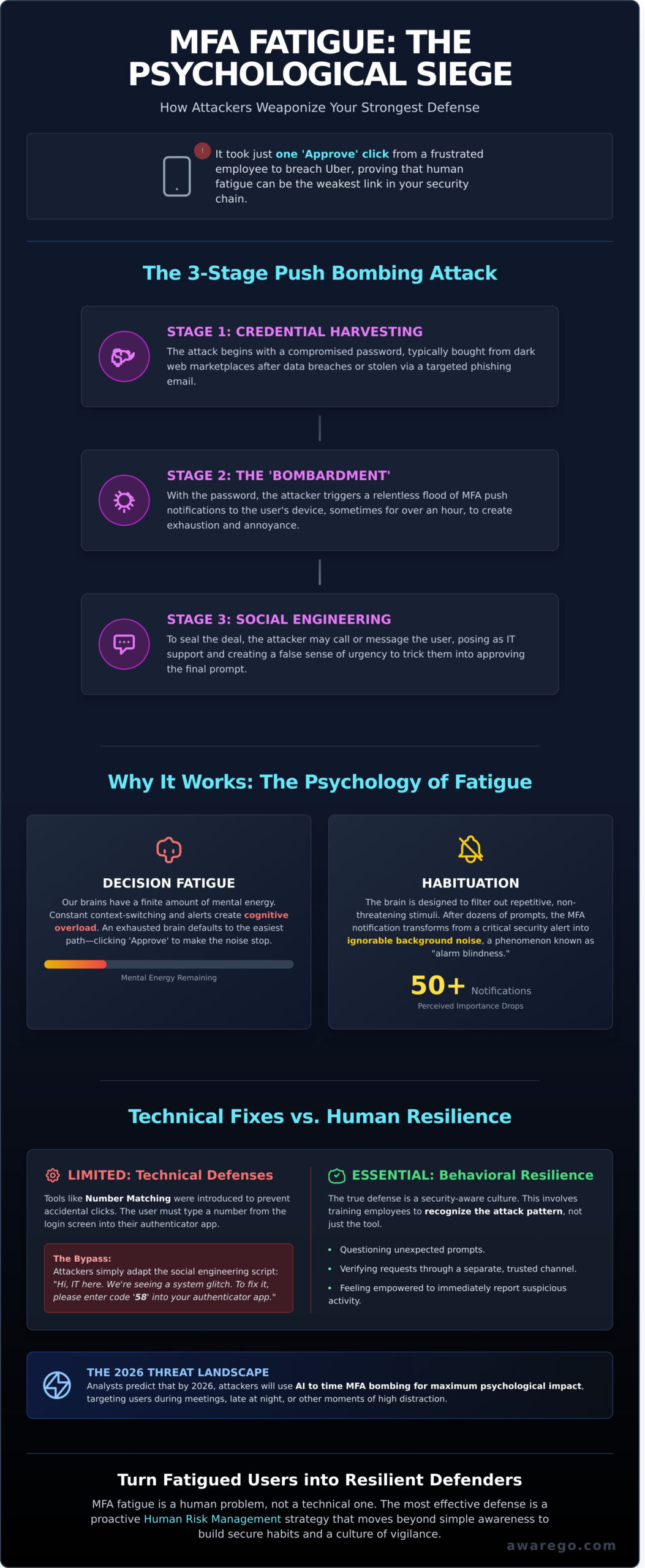
- Step 1: Credential Harvesting. It always starts with a compromised password. Attackers buy your credentials from dark web marketplaces, often sourced from previous data breaches affecting other services, or they trick you into giving them up through a targeted phishing email.
- Step 2: The ‘Bombardment’ Phase. With your password in hand, the attacker initiates the login process over and over. This triggers a flood of MFA push notifications to your device. We’re not talking about two or three prompts; the Lapsus$ group, responsible for attacks in 2022, was known to send notifications for over an hour. By 2026, security analysts predict attackers will use AI to time these prompts for maximum irritation, like during your scheduled meetings or late at night.
- Step 3: The ‘Social Engineering’ Follow-up. To seal the deal, the attacker might call or message you, posing as your company’s IT support. They’ll create a sense of urgency, saying something like, “We’re seeing a system error and need you to approve the last login prompt to resolve it.” This adds a layer of false legitimacy that pressures you into complying.
High-Profile Examples and the 2026 Threat Landscape
High-profile mfa fatigue attacks against companies like Uber and Microsoft in 2022 served as a wake-up call, demonstrating how effective this seemingly low-tech method can be. While security providers have responded with defenses like number matching, savvy attackers are already adapting. They bypass these controls by incorporating the number into their social engineering script. An attacker might call and say, “I’m from IT, the system is glitching. Please enter code ’58’ into your authenticator to resolve it,” preying on the trust you have in your IT department.
These threats aren’t limited to tech giants; any business managing valuable digital assets is a target. The accounts used by a digital firm, such as the Toptarget Online Marketing Ügynökség to manage client advertising campaigns, are prime targets for such takeover attempts, where a single breach can have significant financial consequences.
MFA fatigue is a psychological war of attrition, waged against your attention span. It turns your best defense into an annoyance, proving that the human element remains the most critical factor in your organization’s security culture.
The Psychology of Fatigue: Why Smart Employees Click ‘Approve’
An MFA fatigue attack isn’t a battle of wits. It’s a battle of wills. It succeeds not because your employees are careless, but because they are human. The strategy exploits the predictable, well-documented ways our brains work under pressure. This isn’t a failure of intelligence; it’s a feature of human cognition. Understanding The Psychology of Fatigue reveals that even the most security-conscious person has a breaking point.
Your brain operates with a finite amount of mental energy, a concept known as cognitive load. Every decision, no matter how small, consumes some of this energy. A 2022 study by RingCentral found the average worker toggles between 4 different communication apps up to 10 times per hour. Each notification is a small tax on their focus. When an attacker floods a user with MFA prompts, they are intentionally overloading this system. This leads directly to decision fatigue, a state where your brain, exhausted from making choices, defaults to the easiest option. In this case, the easiest option is clicking ‘Approve’.
Simultaneously, the brain’s habituation process kicks in. Think of it like a ticking clock in your office. The first day, it’s distracting. By the third day, you don’t even hear it. Your brain learns to filter it out as background noise. After the tenth, twentieth, or fiftieth MFA prompt, the notification loses its meaning. It transforms from a critical security checkpoint into an annoying buzz. The employee isn’t consciously choosing to grant access; they are emotionally driven to restore a state of calm and regain their focus.
Habitual Clicking vs. Conscious Authentication
Modern software design has trained us for this failure. The ‘UX of convenience’ rewards fast, thoughtless clicks. We use ‘System 1’ thinking-our fast, intuitive, autopilot mode-to navigate our digital lives. A security prompt, however, demands ‘System 2’ thinking: slow, deliberate, and analytical. An MFA fatigue attack is designed to keep you locked in System 1. This is precisely why the old advice to “just tell them not to click” is a failed strategy. It ignores the deeply ingrained habits that technology has built for us. True resilience requires building better security habits that can function even under cognitive strain.
The Attacker’s Psychological Toolkit
Threat actors don’t just send prompts; they build a narrative. They might call your employee, posing as IT and explaining a “system glitch” that is causing the notifications. This exploits the ‘Helpfulness Bias,’ where people have an innate desire to cooperate and resolve a problem, especially when it seems to be a technical issue. By creating a false sense of urgency or a plausible technical explanation, they lower suspicion and prime the employee to approve the next request. They know exactly how to manipulate human behavior. MFA fatigue attacks succeed by turning our deep-seated desire for a frictionless digital life against us.
Technical Defenses vs. Behavioral Resilience: A Comparison
Your security team is in a constant arms race against attackers. When a new vulnerability appears, you patch it. But what happens when the vulnerability isn’t in the code, but in human behavior? Technical controls are essential, but they are only one part of the solution. They often have a long and complex deployment tail, sometimes taking years to fully implement across an organization.
Take ‘Number Matching’ for MFA push notifications. Microsoft rolled this out in 2023 to combat basic prompt bombing. It was a solid technical step up. The problem? Attackers adapted in weeks. They now simply call the victim, impersonate IT support, and say, “I’m running a diagnostic, please enter the number 86 when it appears on your screen.” The technology works perfectly, but the person was manipulated. This is the gap where technical fixes fall short.
The Limits of Phishing-Resistant MFA
Let’s be clear: FIDO2 and biometrics are the current gold standard. They are designed to be phishing-resistant and can stop most automated attacks cold. But they aren’t a ‘set and forget’ solution. A 2023 Yubico report revealed that while 92% of organizations see the value in phishing-resistant MFA, widespread adoption is slowed by cost, user experience friction, and compatibility with legacy systems.
The biggest challenge is the ‘fallback vulnerability.’ What’s your procedure when an executive loses their hardware key while traveling? Often, the process reverts to a less secure method, like an SMS code or a simple push notification. This single point of failure reopens the exact vulnerability you tried to close, making you susceptible to sophisticated mfa fatigue attacks once again. The best hardware still relies on a human process to manage it.
Building strong security habits is the only way to protect these fallback channels. You need a team that is prepared and resilient. Learn more in our A Guide to Effective Security Awareness Training.
Why Human Risk Management (HRM) is the Critical Layer
This is where Human Risk Management (HRM) becomes your most critical layer. HRM isn’t just about awareness; it’s the active, data-driven process of strengthening your human firewall. It bridges the gap between your technical controls and the daily habits of your employees. You can’t patch human nature, but you can build resilience.
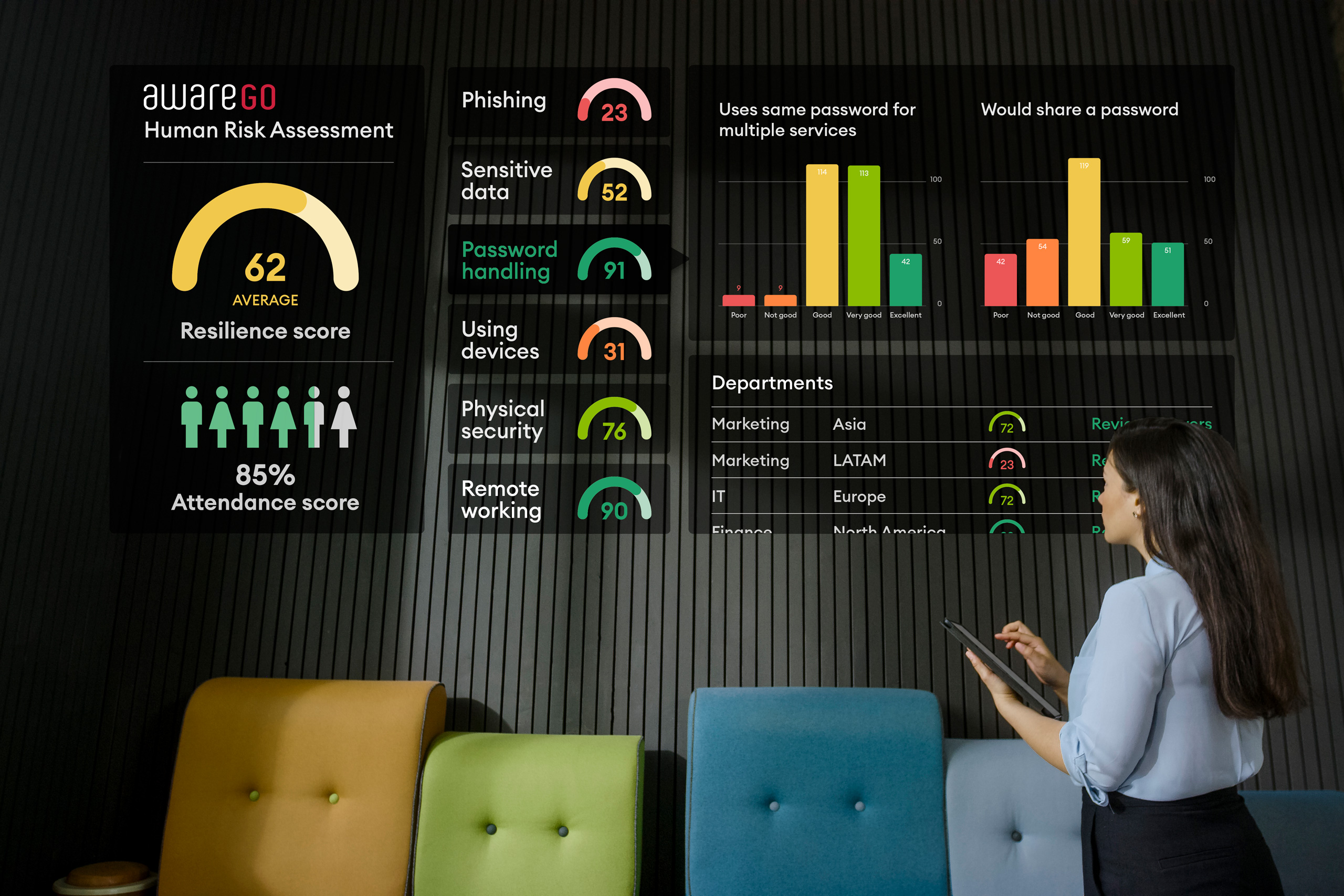
Modern HRM platforms use data to give you a clear picture of your human risk landscape. By analyzing behavior from phishing simulations and micro-learning modules, you can identify which individuals or departments are most susceptible to social engineering. For example, data might show that 15% of your sales team consistently fails phishing tests related to urgent requests. This allows you to deliver targeted, bite-sized training exactly where it’s needed, instead of wasting resources on one-size-fits-all annual training.
The ROI is clear. Constantly reacting to threats is exhausting and expensive. Building behavioral resilience is a proactive investment. A 2022 study by the Ponemon Institute calculated the average ROI of security training at 69%. By fostering a strong security culture, you reduce the number of incidents your security team has to fight, freeing them to focus on strategic threats, not just endless alerts.
The 5-Step Human Risk Framework to Stop MFA Fatigue
Technology alone can’t solve a human problem. While technical controls are essential, they are only one part of the defense against mfa fatigue attacks. The real solution lies in building human resilience. You need a system that treats your employees as your first line of defense, not your weakest link. That’s where a modern Human Risk Management (HRM) framework comes in.
This five-step process moves your organization from passive awareness to active risk mitigation. It’s a continuous cycle designed to build a strong security culture from the ground up.
- Step 1: Assess. You can’t fix what you don’t measure. Start by using targeted micro-assessments to identify which user groups are most susceptible to ‘click fatigue’. Our data shows that employees in fast-paced roles, like sales or support, can be up to 30% more likely to approve a rogue prompt without thinking. This isn’t a fault; it’s a risk factor you can now manage.
- Step 2: Educate. With assessment data in hand, you can deploy training that actually works. Deliver short, engaging micro-learning videos about the mechanics of push bombing and MFA fatigue directly to the employees who need them most.
- Step 3: Empower. Create a ‘no-blame’ reporting culture. Psychological safety is critical. Your employees must feel confident reporting a mistake or a suspicious prompt without fear of punishment. This turns potential victims into vital security sensors for your team.
- Step 4: Hardening. Now, add the technical guardrails. These support your trained employees. Implement controls like rate-limiting to cap MFA prompts at three per five minutes, or use number matching and context-aware prompts that display the user’s geographic location.
- Step 5: Measure. Track the reduction in human risk scores over time. By combining assessment results with reporting data, you can build a clear picture of your security posture. A realistic goal is to reduce your organization’s click-through rate on simulated mfa fatigue attacks by 25% within the first 90 days.
Implementing Micro-Learning for Real-Time Impact
Annual security seminars are obsolete. Ebbinghaus’s Forgetting Curve shows that people forget 70% of new information within 24 hours. That’s why snackable, 3-minute videos are so effective. They build security reflexes and micro-habits, like teaching every user to pause for just two seconds before approving any MFA request and ask, “Did I just initiate this login?” This simple, repeatable action can stop an attack in its tracks. You can find excellent examples in our guide to The Best Security Awareness Videos for Engagement.
Building a Culture of Reporting
Empowerment requires the right tools and the right mindset. Give your team a simple ‘Report Suspicious MFA’ button, just like a ‘Report Phish’ button in their email. This provides a clear, immediate action they can take. Then, celebrate this behavior. Instead of focusing on the 1% who might make a mistake, reward the 15% who actively report threats. If a user admits to an accidental approval, thank them. Then, trigger your incident response plan to secure the account and assign a 90-second refresher video. That’s remediation, not retaliation.
This framework isn’t just theory. It’s a measurable system for reducing human risk. See how our Human Risk Management platform makes it happen.
How AwareGO Transforms ‘Fatigued’ Users into Resilient Defenders
Technical controls are essential, but they can’t stop a threat actor from exploiting human nature. Preventing sophisticated mfa fatigue attacks requires a shift in focus from tools to people. It’s about building a culture of security, not just a wall of technology. This is where Human Risk Management (HRM) moves beyond simple awareness training to create lasting behavioral change.
AwareGO’s HRM platform is a holistic solution designed for the modern workforce. We use principles from cognitive and behavioral science to replace risky habits with secure ones. Instead of one-off, tedious training sessions that contribute to burnout, we deliver continuous, engaging experiences that build resilience. Your people stop being the weakest link. They become your most active and effective line of defense. Start managing your human risk today.
Data-Driven Human Risk Assessments
You can’t fix a problem you can’t see. Our platform begins by identifying your most vulnerable points before an incident occurs. The Employee Cybersecurity Risk Audit benchmarks your organization’s current security posture, revealing specific departments and individuals who might be more susceptible to social engineering tactics. This data-driven approach allows you to tailor interventions precisely where they’re needed most. Learn more about How to Measure and Quantify Human Cyber Risk.
Engagement Through Micro-Learning
Traditional security training is broken. Hour-long videos and dense text blocks don’t work; they create the very “security fatigue” that attackers exploit. Our award-winning micro-learning content is different. We use short, relatable, high-quality videos that are proven to be effective. These frequent, small touchpoints make secure behavior a natural part of the workday, not a disruption.
This approach doesn’t just transfer knowledge; it builds muscle memory. By delivering consistent, positive reinforcement, we help your team develop the instincts to spot and report threats instinctively. This is how you build a truly resilient security culture from the ground up, one that can withstand even persistent mfa fatigue attacks. The result is an organization that is not only compliant but genuinely secure.
Empower your team with AwareGO’s Human Risk Management platform.
Build Your Human Firewall Against MFA Fatigue
The real threat of mfa fatigue attacks isn’t a flaw in your technology; it’s a feature of human psychology. Attackers exploit cognitive overload, not code. This means your best defense isn’t just another software patch. It’s building genuine behavioral resilience within your team. You don’t have to accept human error as a given. You can transform it into a strength.
It’s time to move beyond simple awareness and into active Human Risk Management. Trusted by global enterprises in over 20 countries, AwareGO uses engaging, behavioral science-based micro-learning to build secure habits that stick. Our platform delivers quantifiable security culture improvements, with clients reporting up to a 60% reduction in human-related incidents in the first year. Secure your human layer with AwareGO’s HRM platform and empower your people to become your most effective line of defense.
Frequently Asked Questions
What is the difference between MFA fatigue and push bombing?
Push bombing is the tactic, while MFA fatigue is the human result. Attackers use push bombing to flood your device with authentication requests. The goal is to create MFA fatigue, a state of exhaustion where you approve a request just to make the endless notifications stop. It’s a psychological play, not a technical hack.
How can I tell if my organization is being targeted by an MFA fatigue attack?
You can identify an attack by spotting an unusual number of MFA requests for a single user account. Check your security logs for a high volume of push notifications in a short period, especially outside of normal working hours. According to the 2023 Verizon DBIR, 74% of all breaches involve the human element, so a user reporting these anomalies is your best early warning sign.
Is number matching enough to stop MFA fatigue attacks in 2026?
Number matching is a powerful defense, but it won’t be a complete solution by itself in 2026. This method forces the user to be an active participant, making it much harder for them to accidentally approve a fraudulent prompt. However, determined attackers will evolve, likely combining prompts with social engineering calls to trick users into revealing the number. Your best defense is technology paired with a strong security culture.
Why do employees approve MFA requests they didn’t initiate?
Employees approve fraudulent requests because of conditioned habits and cognitive overload. After approving hundreds of legitimate prompts, the action becomes almost automatic. An attacker exploits this muscle memory. They might also call an employee, pretend to be from the IT help desk, and say, “We’re running a test, please approve the next prompt,” preying on the natural human instinct to be helpful.
What should an employee do if they receive multiple unexpected MFA prompts?
An employee who gets unexpected MFA prompts should immediately deny the request and report it to their IT or security department. You should never approve an authentication you didn’t start. Reporting the incident quickly is crucial. It alerts your security team that an attacker has a valid password and is actively trying to breach your company’s defenses, turning a personal problem into collective intelligence.
How does Human Risk Management help prevent MFA fatigue?
Human Risk Management (HRM) builds your team’s resilience to the psychological pressure used in these attacks. Instead of just telling employees about mfa fatigue attacks, HRM uses data to identify risky behaviors and deliver targeted micro-learning that builds secure habits. It trains people to develop an instinct to pause, question, and report suspicious prompts, transforming your workforce from a vulnerability into a powerful security layer.
Can attackers bypass biometric MFA with fatigue tactics?
Yes, attackers can bypass biometric MFA using the same fatigue principles. They can’t steal your fingerprint, but they can still spam your device with push notifications that require your thumbprint or face scan for approval. After the tenth prompt in two minutes, you might approve it out of annoyance without thinking. The vulnerability isn’t the biometric data; it’s the human response to digital noise.
What are the first steps to take after a successful MFA fatigue breach?
The first step is to contain the threat by immediately revoking all active sessions for the compromised account. Next, force a password reset for that user. Your incident response plan should then guide you to analyze authentication logs to understand the attacker’s activity. CISA recommends reviewing at least 90 days of log data to trace the full scope of the breach and identify any lateral movement.