 Cybersecurity blog



In 2024, the average cost of a data breach climbed to $4.88 million, and a staggering 80% of these incidents involved stolen or weak credentials. You’ve likely noticed that forcing employees to memorize complex strings of symbols only leads to “password123!” variations and sticky notes on monitors. It’s frustrating to watch traditional password security best practices create friction rather than safety. We understand that your team wants to be secure, but they need systems that respect their cognitive limits and daily workflows.
This guide moves you beyond outdated rules to master modern strategies that prioritize human behavior. We promise to show you how to build a resilient security culture that reduces risk without burning out your workforce. We’ll provide a clear checklist for 2026 standards, showing you how to implement effective Human Risk Management and stop credential-based attacks before they start. By the end of this article, you’ll have the tools to turn your greatest vulnerability into your strongest line of defense.
Key Takeaways
- Discover why length now beats complexity in the age of AI-driven attacks and how to update your strategy for 2026.
- Master the “Passphrase” method to create memorable, unshakeable defenses that protect your organization from credential stuffing.
- Implement modern password security best practices by integrating MFA and password managers as seamless, non-negotiable layers of your digital defense.
- Learn how to use empathy and micro-learning to build lasting security habits without causing employee burnout or fatigue.
- See how Human Risk Management (HRM) bridges the gap between technical knowledge and a resilient, high-security organizational culture.
Why Traditional Password Rules Are Failing in 2026
Password security best practices have evolved into a dynamic set of habits. They’re built to mitigate human risk rather than just satisfy a server’s requirements. We’ve moved past the era where a simple capital letter and a digit kept you safe. By 2026, AI-driven brute force attacks have fundamentally changed the math of digital defense. These tools don’t just guess; they learn. They predict. They exploit the very patterns we think make us secure. While traditional password policy guidelines often focused on forced character changes, the 2026 reality demands a more human-centric approach.
AI has rendered “complexity” almost obsolete. Modern hacking algorithms use neural networks to identify common human substitution habits. If you use a “3” instead of an “e,” the software already knows. A 2025 report on credential stuffing showed that AI-enhanced tools can crack standard complex passwords 40% faster than they could just two years ago. This shift means that length is now your most powerful ally. A longer, simpler string of words provides more mathematical resistance than a short, garbled mess of symbols.
We also have to talk about “Security Fatigue.” It’s a real psychological barrier. According to a 2024 study, 67% of employees feel overwhelmed by constant security prompts and strict rotation policies. This exhaustion leads to dangerous workarounds. People start writing passwords on sticky notes or using the same variation across ten different sites. When policies feel like a hurdle, human risk increases. We’re shifting the focus from technical settings to Human Risk Management (HRM). The goal is to build a resilient security culture where habits are easy to maintain and hard to break. We want to empower you to feel confident, not frustrated.
The Death of the 8-Character Password
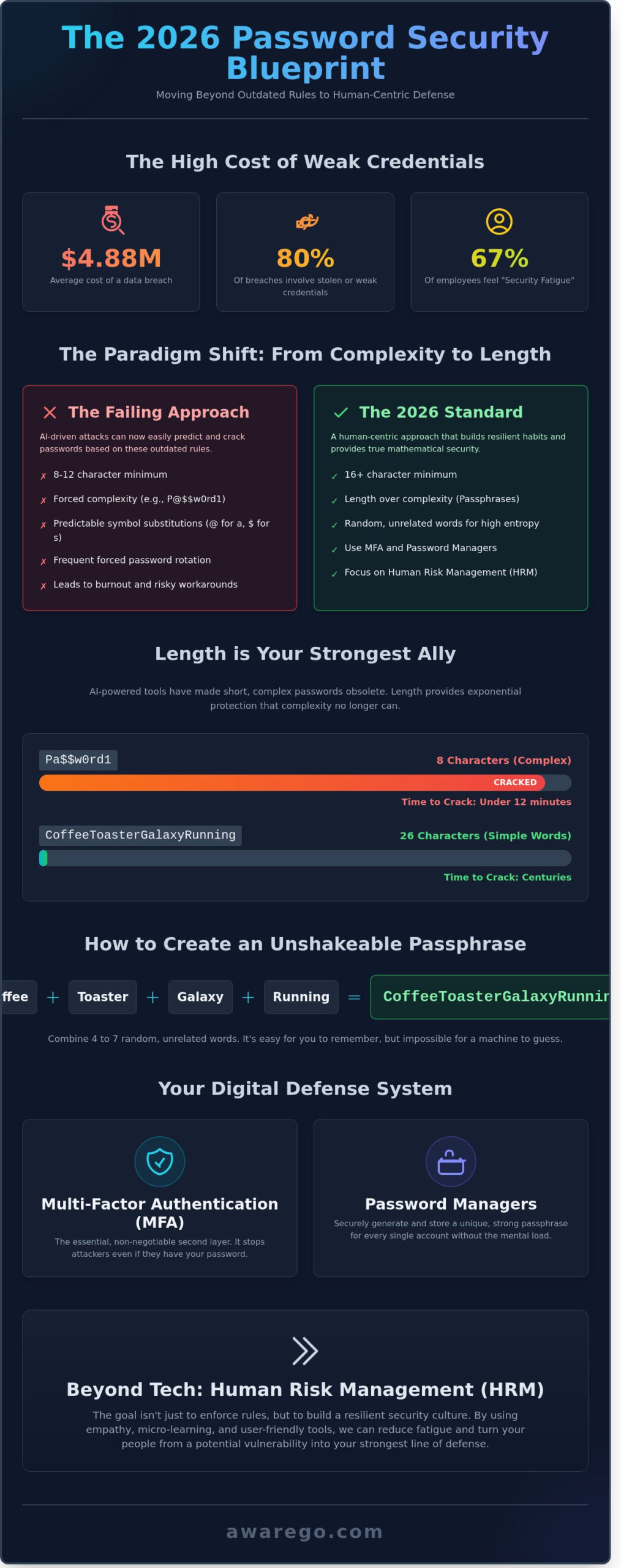
The 8-character password is officially a relic. In 2026, a standard consumer-grade GPU can crack an 8-character password in under 12 minutes. That’s why we now recommend a 16-character minimum as the baseline for any sensitive account. It sounds daunting, but length provides the exponential protection that complexity lacks. The brute-force threshold is the time required for a computer to guess a password; at 16 characters, that time jumps from minutes to centuries. This simple shift in habit significantly lowers the human risk profile of your entire organization.
The Complexity Trap: Why Symbols Alone Won’t Save You
Adding a dollar sign won’t save you if the foundation is weak. Hackers know you replace “s” with “$” and “a” with “@.” These predictable patterns are baked into modern cracking algorithms. A password like “Pa$$w0rd123” is actually easier to crack than a long string of four random, simple words. Randomness beats forced character types every time. You don’t need to memorize a string of gibberish. Instead, focus on creating phrases that are easy for your brain to remember but impossible for a machine to predict. This approach makes password security best practices feel like a natural part of your day rather than a technical chore.
- Length over complexity: Aim for 16+ characters.
- Avoid patterns: Don’t use common substitutions like “1” for “i.”
- Prioritize HRM: Focus on habits that reduce fatigue and increase resilience.
- Randomness is key: Use unrelated words to create a passphrase.
The 2026 Blueprint: Creating Strong and Memorable Passwords
The old rules of password creation are officially retired. For years, you were told to swap letters for symbols and include a mix of cases. This led to “P@ssw0rd123” becoming a standard, which is a gift to modern hackers. Today, brute-force software can crack an eight-character password with complex symbols in less than an hour. To stay ahead, we have to shift our focus from complexity to length. This is where the passphrase becomes your most effective tool for resilience.
Passphrases vs. Passwords
A passphrase is a string of random, unrelated words. It’s much longer than a traditional password but significantly easier for you to remember. While a bot struggles with the sheer number of character combinations in a 20-character string, your brain can easily recall a vivid image. Current NIST password guidelines favor this approach, suggesting that length is the primary defender against modern attacks. A strong passphrase should consist of four to seven words.
- Weak: BlueSky123! (Short, predictable, and easily guessed by algorithms).
- Strong: CoffeeToasterGalaxyRunning (High entropy, long, and simple to type).
This method works because it aligns with how our brains function. We don’t remember random strings of characters well, but we’re great at visualizing stories. By adopting this, you’re implementing password security best practices that actually work for humans, not just for machines.
Eliminating the “Password Reuse” Habit
Credential stuffing is the number one threat to your digital identity. In 2023, these attacks surged by 71%, targeting users who use the same login across multiple sites. When a low-security site like a local pizza shop gets breached, hackers take those emails and passwords and “stuff” them into banking or corporate portals. If you’ve reused that password, your entire digital life is compromised in seconds. Breaking this habit is the single most important step in password security best practices.
We understand that creating a unique string for every site feels like a technical hurdle. To overcome this psychological barrier, try categorizing your accounts by risk level. This makes the task feel manageable rather than overwhelming. You can build a more resilient security culture within your own daily routine by following this simple framework:
- Tier 1 (Critical): Banking, primary email, and work logins. These require unique, 20+ character passphrases.
- Tier 2 (Sensitive): Social media and shopping sites. These need unique strings but can be slightly shorter.
- Tier 3 (Low Risk): Newsletters or one-time forums. Use a secondary email and a unique but simpler password.
Anchor Memories and Nonsense Logic
To create a passphrase that’s impossible to guess but easy to recall, use “Anchor Memories.” Think of a specific, private memory from your life. Maybe it’s a specific meal you had in 2015. Combine that with “Nonsense Logic.” If the words in your passphrase make sense together, like “ILoveMyDog,” they are easier for hackers to predict using dictionary attacks. If they are nonsensical, like “TacoPianoJupiterRunning,” the entropy increases exponentially. This blend of personal meaning and logical randomness creates a shield that protects your data without causing the usual “password fatigue” that leads to human error.
Essential Tools: MFA and Password Managers
Security isn’t a technical hurdle you have to jump over. It’s a habit you build to protect your hard work and your team. When we talk about password security best practices, we focus on tools that empower you rather than slow you down. Multi-Factor Authentication (MFA) and password managers are the two pillars of a modern, resilient security culture. They take the pressure off your memory and put the control back in your hands.
MFA: The Ultimate Safety Net
MFA isn’t an “extra” layer anymore. It’s a non-negotiable requirement for digital life. Industry data from Microsoft shows that MFA stops 99.9% of bulk phishing attacks. It works because it requires something you know plus something you have. Not all methods provide the same level of resilience. SMS codes are better than nothing, but they’re vulnerable to SIM swapping. Authenticator apps are a stronger choice for most users. If you work in a high-risk environment, FIDO2 hardware keys like YubiKeys provide the most secure protection because they’re physically tied to your device.
You might have heard of “MFA Fatigue.” This occurs when an attacker sends dozens of push notifications to your phone, hoping you’ll click “Accept” just to make it stop. Organizations now prevent this by using “number matching.” You must type a specific code from your screen into the app to verify the request. This small change stops mindless clicking. It forces a moment of awareness, ensuring you’re only granting access when you actually intend to. This approach turns a technical check into a conscious act of protection.
Why Password Managers are a Human Risk Solution
Our brains aren’t designed to store dozens of complex passwords. When we force it, we create human risk by reusing weak phrases or predictable patterns. Password managers remove this burden entirely. They allow you to generate and store unique, high-entropy strings for every account. By 2026, enterprise solutions have evolved to include features like secure vault sharing and emergency access protocols. These tools make compliance feel seamless. They ensure that security doesn’t get in the way of your team’s productivity.
A common fear is the “single point of failure” idea. Many worry that if the manager is breached, every account is lost. Factual evidence shows this is unlikely with reputable providers. Top-tier managers use zero-knowledge encryption. This means the provider never sees your data or your master key. Even if their servers are compromised, your vault remains an unreadable block of encrypted data. A Master Password is the one key that must be truly uncrackable because it serves as the foundation for your entire digital identity. Following CISA’s advice on protecting passwords will help you create a master key that balances strength with memorability. This remains one of the most vital password security best practices for any professional.
We’re also seeing a major shift toward passkeys. This technology uses biometrics or local device pins to replace passwords entirely. It’s faster and removes the risk of phishing because there’s no secret string for an attacker to steal. As more platforms adopt this passwordless approach, your digital experience becomes both simpler and more secure. Moving toward these tools isn’t just about tech. It’s about creating a workspace where staying safe is the easiest thing to do.
How to Roll Out Password Security Without Employee Burnout
Let’s be honest. Security often feels like a hassle. Your team just wants to get their work done, and another complex password requirement feels like a roadblock. We get it. To build a true security culture, you must move away from being a strict enforcer and become a supportive partner. Explaining the “why” behind these changes is the first step toward empathy. When people understand that 81% of data breaches involve weak or stolen credentials, they stop seeing a policy as a nuisance and start seeing it as a shield for their own hard work. It’s about protecting their data as much as the company’s assets.
The Power of Micro-Learning in Security
Traditional 60-minute security lectures fail because of the Ebbinghaus Forgetting Curve. Research shows that employees forget up to 70% of new information within just 24 hours if they don’t apply it immediately. Micro-learning solves this by delivering 2-minute bursts of knowledge. This frequency builds habits that stick over time. You can find high-quality, engaging content on our Security Awareness Videos page to keep your team informed without draining their productivity. These short lessons make password security best practices feel like a natural part of the workday rather than an annual marathon.
Timing is everything in behavioral science. Use “Just-in-Time” training to deliver a quick tip exactly when a user is setting up a new account or changing a password. This relevance increases retention by 40% compared to generic training sessions. You should also lean into gamification and positive reinforcement. Instead of punishing mistakes, reward departments that reach a 95% compliance rate. A simple shout-out or a small team perk creates a competitive, positive atmosphere around Human Risk Management (HRM). It turns a technical requirement into a team win.
Building a “No-Blame” Security Culture
A “no-blame” culture is your fastest defense against a total system collapse. If an employee fears being fired for a compromised password, they’ll hide the mistake. This silence increases “dwell time,” which is the period a hacker stays undetected in your system. According to IBM’s 2023 Cost of a Data Breach Report, the average dwell time is 277 days. Encouraging immediate, honest reporting can slash this number significantly. When your leadership team models password security best practices openly, it signals that security is a shared responsibility, not a trap. Leaders must show they use password managers and MFA too.
To make this stick, consider these practical steps:
- Celebrate reporting: Publicly thank employees who flag suspicious activity or report their own errors.
- Transparent leadership: Have executives share their own challenges with security to humanize the process.
- Low-friction tools: Provide a password manager so employees don’t have to memorize dozens of complex strings.
- Regular feedback loops: Ask employees what makes security hard for them and adjust your policies based on that data.
Reducing human risk isn’t about creating more rules. It’s about creating a resilient environment where everyone feels capable and supported. By focusing on small, frequent interactions and a culture of transparency, you turn security from a source of burnout into a point of pride.
Ready to transform your team’s security habits? Start your journey with Human Risk Management today.
Scaling Security Habits with AwareGO’s Human Risk Management
Knowing you need a strong password isn’t the same as actually using one. In fact, 74% of all data breaches include a human element, ranging from simple errors to the misuse of privileged access. AwareGO acts as the critical bridge between theoretical knowledge and daily action. We don’t just deliver information; we transform how your team interacts with digital threats. By focusing on the “doing” rather than just the “knowing,” we help your organization implement password security best practices that actually stick.
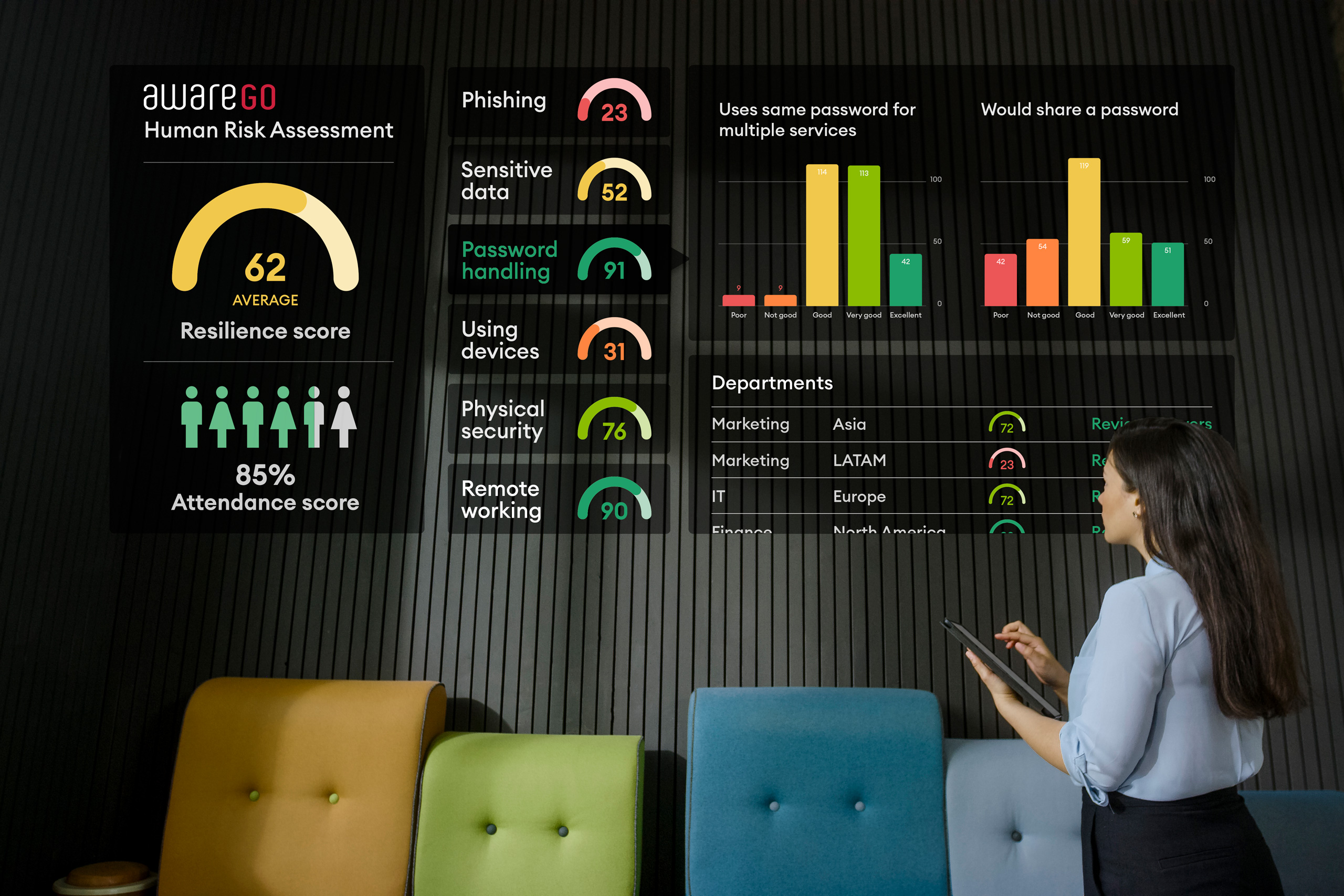
Our Human Risk Assessment (HRA) is the starting point for this transformation. Instead of broad, generic training, the HRA identifies exactly which employees struggle with password hygiene. You might find that your marketing team excels at spotting phishing but fails at password complexity, while your finance department has the opposite problem. This data-driven approach allows you to tailor your efforts where they’ll have the most impact. Within the first 90 days of using our targeted content, many organizations see a 30% reduction in high-risk behaviors.
Instead of relying on guesswork, you gain access to real-time insights. You can measure the actual improvement in your security posture through concrete metrics. This isn’t just about checking a compliance box. It’s about building a measurable layer of defense that evolves alongside the threat landscape. Your workforce stops being a point of failure and starts being your most reliable security asset.
From Passive Awareness to Active Habit Formation
We use behavioral science to drive long-term change. Most training is forgotten within hours because it’s boring or overly technical. AwareGO uses micro-learning: short, punchy, and relatable stories that fit into a busy workday. These “nudges” help employees internalize password security best practices without feeling overwhelmed. Over time, these small interactions solidify into permanent habits that protect your company’s data around the clock.
The Human Risk Management Software dashboard gives you a bird’s-eye view of this progress. You can track individual and departmental risk scores, seeing exactly how your security culture is strengthening. This visibility allows IT leaders to move from a reactive “firefighting” mode to a proactive strategic role. You’ll have the data to prove that your training budget is delivering a tangible return on investment through reduced risk and improved employee confidence.
- Behavioral Science: We use psychological triggers to make security memorable.
- HRM Dashboard: Real-time tracking of employee risk levels and progress.
- Continuous Learning: Frequent, short updates keep security top-of-mind.
Ready to Secure Your Human Element?
Traditional security relies on enforcement; we believe in empowerment. When employees understand the “why” behind the rules, they’re much more likely to follow them. Our philosophy centers on making security feel like a shared responsibility rather than a technical hurdle. This shift in mindset reduces anxiety and builds a resilient culture where everyone plays a part in defending the organization.
You have the power to turn your workforce into a sophisticated defense system. Don’t wait for a password-related breach to reveal the gaps in your training. Take the first step toward a more secure future by seeing how our platform works in your specific environment. Book a Human Risk Audit with AwareGO today to identify your vulnerabilities and start building a world-class security culture.
Mastering the Human Side of Cybersecurity
Security in 2026 isn’t about forcing your team to memorize impossible strings of random characters. It’s about shifting from outdated, rigid rules to sustainable digital habits that actually stick. You’ve seen how traditional requirements often lead to employee burnout and hidden workarounds. By adopting a human-centric approach, you transform your workforce into your strongest defense. Implementing password security best practices requires more than a policy update; it demands a genuine shift in your organization’s security culture.
AwareGO helps you bridge the gap between technical needs and human behavior. Our platform is currently trusted by global enterprises to secure over 1 million employees. We replace tedious training with an award-winning micro-learning content library designed for the modern professional’s attention span. You’ll also leverage data-driven Human Risk Assessment tools to identify and mitigate vulnerabilities in real time. This is active Human Risk Management (HRM) that builds measurable resilience across your entire firm.
Start Managing Your Human Risk with AwareGO
You have the power to create a safer workplace today. We’re ready to help you lead that change with confidence.
Frequently Asked Questions
How long should a secure password be in 2026?
Aim for a minimum of 16 characters to stay ahead of automated brute-force tools in 2026. Longer sequences create exponential complexity that current hardware cannot easily solve. Using 16 characters instead of 8 increases the possible combinations by a factor of trillions. This simple habit builds your personal digital resilience and protects your most sensitive data from sophisticated automated attacks.
What is the most secure way to store my passwords?
Use a dedicated, end-to-end encrypted password manager like Bitwarden or 1Password. These tools are central to password security best practices because they remove the human risk of forgetting or reusing credentials. They store your data in a secure vault that only you can access with a master key. This approach moves you away from risky habits like writing passwords on paper or using the same one for 5 different sites.
Is it safe to use my browser’s built-in password manager?
Browser-based managers offer basic protection, but they’re more vulnerable to specialized malware that targets local browser files. A 2023 report showed that info-stealing malware often scrapes these local databases first. Dedicated managers provide an extra layer of encryption that stays independent of your web surfing habits. They help you build a stronger security culture by keeping your credentials isolated from your daily browsing activities.
How often should I change my passwords?
Change your passwords only when you receive a breach notification or suspect unauthorized access. Microsoft research from 2019 proved that forced periodic changes actually lead to weaker passwords as people choose predictable patterns. Focus on creating one strong, unique password instead of rotating mediocre ones every 90 days. This shift in mindset reduces your cognitive load and makes your security habits more effective and sustainable.
What makes a passphrase better than a complex password?
Passphrases are superior because they’re longer and easier for humans to remember but harder for machines to guess. A 20-character passphrase like “Purple Coffee Running 2026” is much stronger than a short, complex string like “P@ss1!”. It takes modern computers significantly longer to crack length than complexity. By choosing passphrases, you’re working with your brain’s natural memory patterns while boosting your digital resilience.
Can hackers crack MFA (Multi-Factor Authentication)?
Hackers can bypass MFA using tactics like MFA fatigue, where they spam your phone with 50 notifications until you click approve out of frustration. The 2022 Uber breach proved that even strong technical hurdles can fail if the human element is exploited. Use hardware keys like YubiKeys or authenticator apps instead of SMS codes to stay secure. These tools make your defense more seamless and less prone to human error.
What should I do if I think my password has been leaked?
Change the compromised password immediately and enable MFA on that account if you haven’t already. Check HaveIBeenPwned to see if your data appeared in any of the 12 billion leaked records currently indexed. Following these password security best practices helps contain the damage before it spreads to other accounts. It’s about taking quick, decisive action to manage your human risk and restore your digital safety.
Are passwords becoming obsolete with the rise of passkeys?
Passkeys are the future, but passwords will remain relevant for the 40% of legacy systems that don’t yet support modern standards. Google introduced passkeys for all users in 2023, signaling a major shift toward a passwordless world. While we transition, you’ll still need to manage traditional credentials for many older platforms. Embracing this new technology now will make your digital life more engaging and secure as the industry evolves.